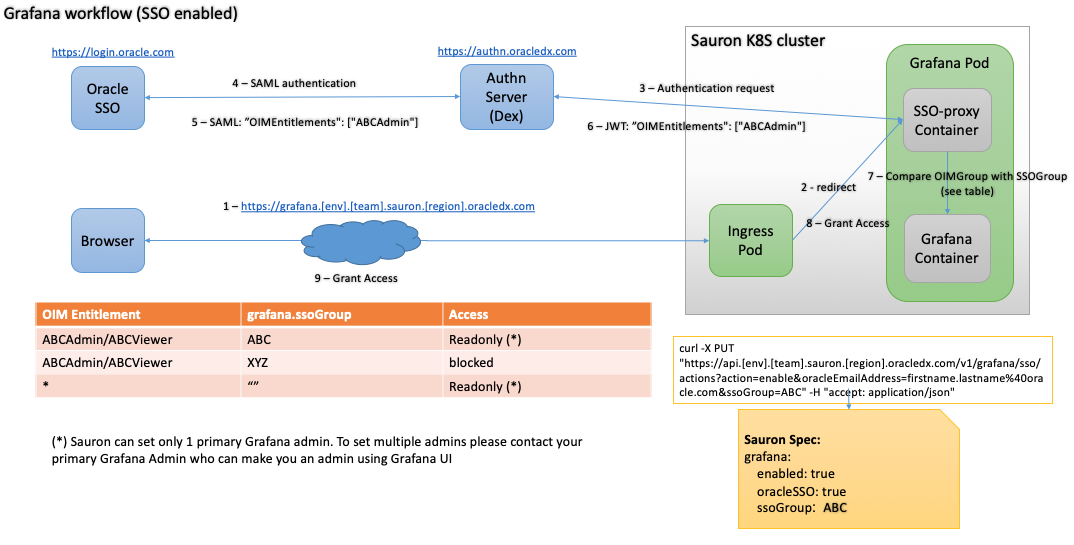
Oracle SSO for Sauron Endpoints
Use this page to enable Oracle Single Sign-On (SSO) for Sauron UI endpoints and restrict access with Oracle Identity Manager (OIM) entitlements.
SSO access uses OIM entitlements to map users to Sauron roles. Create and verify the OIM entitlement model before enabling Global SSO.
Who does what?
| Task | Who usually does it |
|---|---|
| Decide which users need Admin, Viewer, or Grafana Editor access | Sauron owner or customer team |
| Create new Sauron OIM entitlements | Sauron team |
| Approve or add users to existing OIM entitlements | OIM entitlement approver |
| Enable Global SSO for the Sauron | Sauron admin through the Sauron API |
| Sign out and back in after an entitlement change | Affected user |
Before you enable SSO
Check these items first:
- OIM entitlements exist for the team.
- Users know whether they need Admin, Viewer, or Grafana Editor access.
- Required users have requested or received the correct entitlement.
- You know the
ssoGroupvalue to use for the Sauron. - You have access to the Sauron API endpoint.
When Global SSO is enabled, restricting access using OIM entitlements is mandatory.
HTTP basic authentication credentials still work after SSO is enabled for Sauron endpoints.
OIM role behavior
If a user belongs to multiple OIM entitlements, the higher-privileged role takes precedence. For example, if a Grafana user belongs to both [Team]Editor and [Team]Viewer, the user is assigned the [Team]Editor role.
| Entitlement | Access |
|---|---|
[Team]Admin |
Full access to the Sauron API endpoint. |
[Team]Viewer |
Read-only access to the Sauron API endpoint. Non-GET APIs return Access Denied. |
[Team]Editor |
Grafana Editor access for Grafana 8.x and above. |
OIM permission changes are not reflected until the user logs out and logs back in using SSO.
If a user is not part of any Sauron OIM entitlement, Sauron shows an access error in the browser.
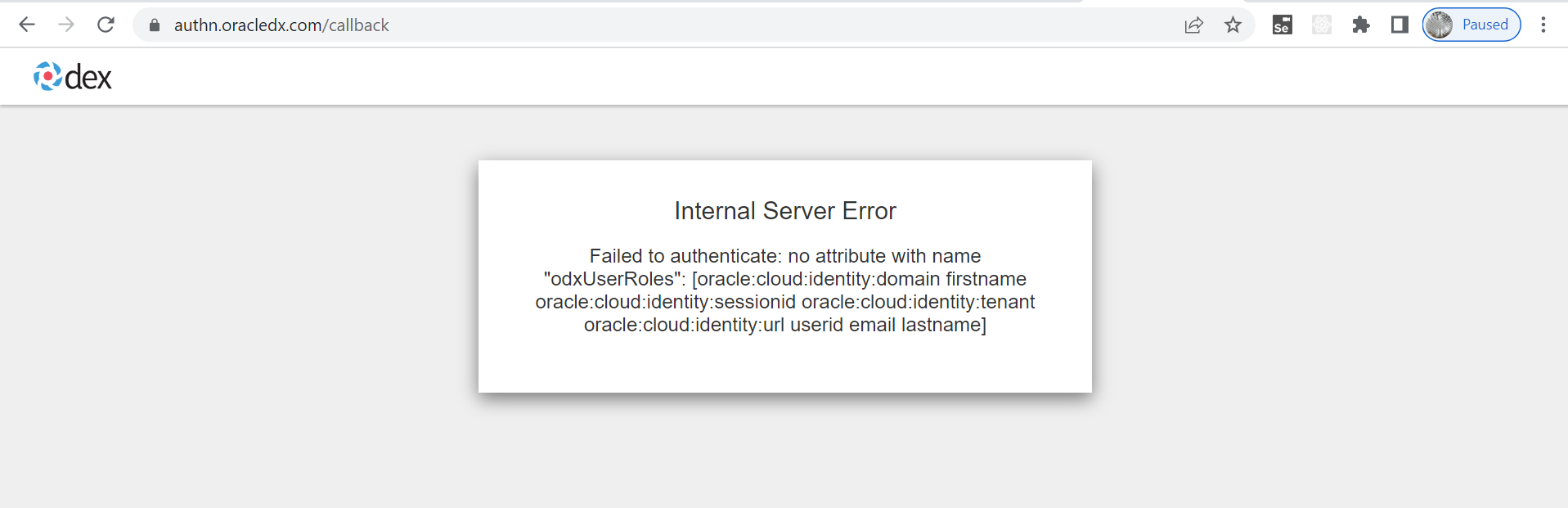
Enable SSO
Global SSO enables SSO for these Sauron UI endpoints:
- Alertmanager
- API
- Console
- Grafana
- Help
- OpenSearch Dashboards
- Prometheus
- Thanos
- Thanos Rule
Steps:
- Create OIM entitlements first. See OIM Entitlements for RBAC.
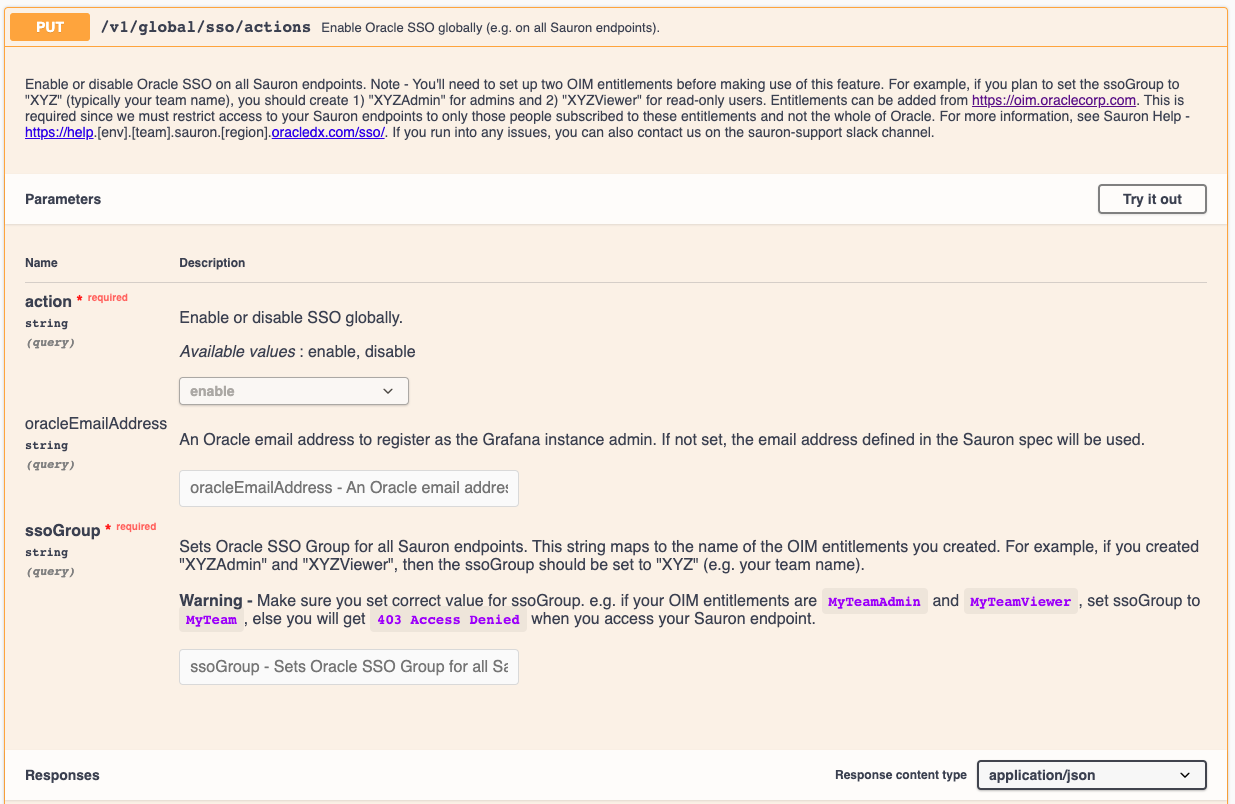
- Open PUT /v1/global/sso/actions.
- Click Try it Out.
- Select
enable. - Enter the
ssoGroupvalue. - Click Execute.
- Confirm the response status is
200. - Wait 2-3 minutes for Sauron pods to restart.
- Open a Sauron endpoint, such as https://kibana.stage.apatil.developers.oracledx.com, and confirm it prompts for Oracle SSO credentials.
For example, if the team name is MyTeam, set ssoGroup to MyTeam when the entitlements are named MyTeamAdmin and MyTeamViewer.
If the browser still uses an old session, restart the browser or clear the browser cache, then try again.
Prove it works before production
After enabling SSO:
- Confirm
PUT /v1/global/sso/actions?action=enablereturned200. - Confirm the Sauron pods restarted.
- Open each required endpoint in a browser.
- Confirm the endpoint prompts for Oracle SSO.
- Sign in as a user with the expected entitlement.
- Confirm the user receives the expected role.
- For a recent entitlement change, sign out and back in before treating access as failed.
Grafana role notes
Grafana 7.x only
Grafana 7.x does not support passing roles as auth proxy headers in its OSS version. For this reason, by default only one admin created on the Sauron instance account has admin access to the Grafana 7.x endpoint.
To add more Grafana 7.x administrators:
- Add the user to the
MyTeamAdminentitlement in OIM. - Follow the SSO enablement step and provide each user's email address for the
oracleEmailAddressparameter. - Use the correct
ssoGroupvalue every time you call PUT /v1/grafana/sso/actions. - Check the current
ssoGroupwith GET /v1/sso/status if needed.
If ssoGroup is empty, all Oracle users have Viewer access to the Grafana endpoint.
Grafana 8.x and above
For Grafana 8.x and above, Sauron supports Admin, Editor, and Viewer roles out of the box. Sauron maps MyTeamAdmin, MyTeamEditor, and MyTeamViewer OIM entitlements to the corresponding Grafana roles. No extra manual step is needed.
Self-check before escalation
Most questions for this topic can be resolved with the steps above. For SSO or access-denied questions, collect:
- Sauron URL.
- Endpoint that failed.
- Component.
- Authentication method: SSO.
- Affected user email.
- Expected role.
ssoGroupvalue if known.- Exact OIM entitlement name if known.
- Exact error/status or screenshot.
- Start time.
- Recent SSO, entitlement, or browser-session changes.
- Checks completed.
- Production impact, if any.
- Whether the user signed out and back in after access was approved.
Architecture
Grafana SSO flow