Shuttleproxy
Shuttleproxy enables Sauron Prometheus to scrape metrics endpoints that are not directly reachable because the service network blocks ingress from Sauron.
The Shuttleproxy client runs in the network that can reach your metrics endpoint. It connects out to the Sauron Shuttleproxy server, so you do not need to arrange direct ingress into the environment where your application services run.
When do I need Shuttleproxy?
Use Shuttleproxy when:
- Your target exposes Prometheus-compatible metrics.
- Sauron Prometheus cannot directly reach the target because ingress is blocked.
- The network running the Shuttleproxy client can reach the target host, port, and metrics path.
- The network running the Shuttleproxy client can make outbound HTTPS connections to the Sauron Shuttleproxy endpoint.
- You know which Sauron and region should scrape the target.
If Sauron Prometheus can reach the metrics endpoint directly, use a direct Prometheus scrape job instead.
Architecture overview
The diagram shows the Sauron services and customer-side components involved in Shuttleproxy scraping.
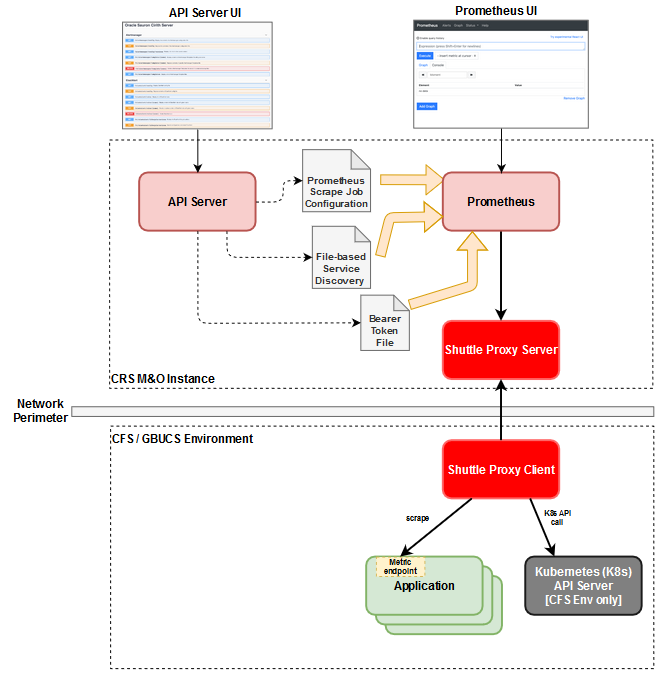
| Component | Role |
|---|---|
| Sauron instance | Monitoring and observability instance where services such as Grafana and Prometheus run. |
| API Server | Sauron service used to manage Prometheus and Alertmanager configuration. |
| Prometheus | Sauron service that collects metrics from application services and other resources. |
| Shuttleproxy server | Sauron service that allows Prometheus to scrape metrics from remote network environments without requiring ingress into that environment. |
| Shuttleproxy client | Customer-side component that connects to the Shuttleproxy server and reaches the target metrics endpoint. |
| Application | Service that exposes a Prometheus-compatible /metrics endpoint. |
| Kubernetes API server | Optional source for dynamic discovery when the monitored application is deployed on Kubernetes. |
Prove it works before production
Before relying on Shuttleproxy for production scraping:
- Confirm the Shuttleproxy client can resolve the Shuttleproxy endpoint DNS name.
- Confirm the client can make outbound HTTPS connections to the Shuttleproxy endpoint.
- Confirm the domain ID and client ID match the intended Sauron setup.
- Confirm the client can reach the target host and port.
- Confirm the target appears on the Prometheus targets page.
- Confirm the target is
UP. - If registration or scraping fails, collect client log lines and the Prometheus target error with passwords, tokens, and private keys removed.
Prometheus scrape configuration
Shuttleproxy is used with Prometheus scrape configuration. The main scrape job types are:
| Scrape job type | When it applies |
|---|---|
| Dynamic discovery | Prometheus discovers target metrics endpoints through a supported service discovery mechanism, such as a Kubernetes API server. |
| Static | Each target metrics endpoint is identified with its IP address or DNS name and port. |
| File-based discovery | Configuration files contain statically defined targets, and Prometheus picks up file changes automatically. |
Dynamic discovery scrape jobs apply to environments where services are deployed on Kubernetes. Static and file-based discovery can apply to all environments.
For detailed scrape configuration examples, see:
- Dynamic Discovery Prometheus Scrape
- Pod Dynamic Discovery Scrape Job Example
- Service Endpoint Dynamic Discovery Scrape Job Example
- Dynamic Prometheus Scrape Using Shuttle Proxy Domain Feature
- File-Based Service Discovery Scrape
- Basic Static Prometheus Scrape Job
- Static Prometheus Scrape Using Shuttle Proxy Domain Feature
- Federating Metrics from Prometheus Servers using Shuttle Proxy
Domains
Shuttle Proxy (SP) v1.2.2 introduced the ability of a single SP server to support multiple SP clients in different network domains. This is useful when one Sauron instance needs to scrape targets from multiple network domains while preserving network separation.
For more information, see:
Shuttleproxy client guide
The Shuttleproxy client can be deployed in containerized environments such as Docker or Kubernetes.
For deployment details, see:
IP whitelisting and network rules
Shuttleproxy has a server side and a client side, so ingress and egress rules can be confusing when configuring on-prem or restricted-network access.
Customer egress policy
The Sauron team generally recommends whitelisting all OCI public CIDRs in the egress allowed list.
As an alternative, customers can whitelist the Shuttleproxy load balancers' IP addresses, with one caveat: changes to the Sauron cluster that affect the Shuttleproxy service, such as increasing replica count, have a high probability of updating or replacing those load balancers. Be prepared to use a dynamic solution to obtain the IP and update the allowlist.
Some teams have set up automation that registers the Shuttleproxy server public FQDN as an egress policy. That automation is outside the scope of this page, but it is another possible path for allowing access.
Customer ingress policy
Ingress is generally unnecessary for Shuttleproxy. For completeness, if Prometheus needs to scrape additional targets directly, the customer should allow Sauron's internet gateway.
To obtain OCI Service Network CIDRs for a region such as us-phoenix-1, use:
curl --silent --show-error 'https://docs.oracle.com/en-us/iaas/tools/public_ip_ranges.json' \
  | jq -r '.regions[] | select(.region=="us-phoenix-1") | .cidrs[] | select(.tags[]=="OSN") | .cidr'
Sauron ingress policy
For on-prem customers, Sauron's own ingress rules may need to be updated because Sauron instances generally allow all OCI regions and not external internet traffic.
If you connect from the public internet, provide the CIDRs of your firewall or other egress points to the Sauron team.
Self-check before escalation
Most questions for this topic can be resolved with the setup and troubleshooting checks above. For 403, 504, DNS, registration, or missing-scrape-target symptoms, collect:
- Sauron URL.
- Shuttleproxy endpoint.
- Domain ID.
- Client ID.
- Target host, port, and metrics path.
- Authentication method.
- Exact error/status.
- Start time.
- Recent endpoint IP, firewall, allowlist, or scrape configuration changes.
- Whether the Shuttleproxy client can resolve the Shuttleproxy endpoint.
- Whether the client can make outbound HTTPS connections to the Shuttleproxy endpoint.
- Whether the client can reach the target host and port.
- Whether the target appears on the Prometheus targets page.
- Prometheus target error.
- Relevant Shuttleproxy client log lines.
- Production impact, if any.
Do not paste passwords, tokens, private keys, or other secret values in support channels.